
In the world of mobile app development, few terms cause as much confusion as Deep Links vs Dynamic Links vs Universal Links. I see engineers and growth teams use these terms interchangeably every day, leading to fundamental misunderstandings about what they do, how they work, and what infrastructure you actually need to build a viral loop.
As the CTO of Tapp, I am going to break down each concept, explain how they relate to the underlying OS architecture, and clarify the critical difference between an actual technology and a retired Google product name. This is your definitive 2026 guide to ending the confusion for good.
Section 1: What is a Deep Link? (The Foundation)
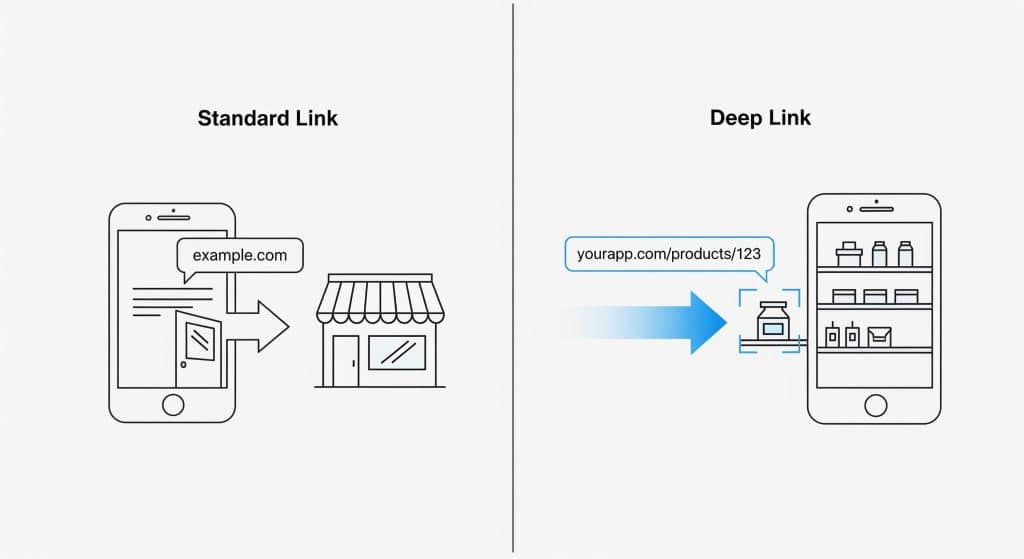
Let’s start with the absolute basics. A deep link is any link that takes a user to a specific piece of content inside a mobile app they already have installed.
That’s it. If a link opens your app directly to a specific paywall, a user’s profile, or a particular shopping cart, it’s a deep link. It bypasses the home screen and takes the user deeper into the native app’s content.
The Analogy: Think of a deep link as a specific bookmark for a page inside your app, not just a shortcut to the front door. A standard website link (yourapp.com) is the front door. A deep link (yourapp.com/products/123) takes you directly to the specific aisle and shelf where product 123 is located.
Section 2: What are Universal Links & App Links? (The OS-Level Technology)
So, how do deep links actually execute on the device? The magic happens through native technologies provided by the operating systems themselves.
- Universal Links is Apple’s native technology for iOS.
- Android App Links is Google’s native technology for Android.
These are the secure, modern implementations of deep linking. They work by creating a trusted cryptographic association between your website domain and your mobile app. When a user with your app installed clicks a link from your domain (e.g., https://shop.yourbrand.com), the OS intercepts it and opens the app directly, rather than loading the website in a mobile browser.
However, they have one critical, deal-breaking limitation for growth marketers: Universal Links and App Links only work if the user already has the app installed. If the app isn’t on their device, the link simply opens your website in their browser, and your user acquisition funnel breaks.
Section 3: What is a “Dynamic Link”? (The Product vs. The Technology)
This is the source of most of the confusion in the deep link vs dynamic link debate. Here is the reality:
“Dynamic Link” was simply Google’s brand name for a product (Firebase Dynamic Links) that did more than just deep linking.
The underlying technology, which is more accurately called dynamic deep linking, is a smart link that bundles multiple technologies into a single URL. It creates a seamless user experience by intelligently routing users based on their device platform and whether they have the app installed.
So, while a native “deep link” has a single destination (a screen in an installed app), a “dynamic link” relies on server-side conditional logic. It asks a series of questions to figure out the best place to send a user. This brings us to the magic ingredient.
Section 4: The Key Differentiator: Deferred Deep Linking
What made dynamic links so famous? A feature called deferred deep linking.
This is the engineering “magic” that made products like Firebase Dynamic Links so valuable for user acquisition. It ensures the tracking payload and user journey are never broken, even if the user is forced into the App Store to install the app first.
When I built the Tapp SDK, ensuring this deferred data survived the install process with a 100% match rate was my highest priority. Here is the step-by-step architecture of how our dynamic deep linking infrastructure works:
- A user clicks a shared link (e.g.,
tapp.so/promo-abc). - Our server checks the user’s device (iOS or Android) and evaluates if the corresponding app is installed.
- If the app IS NOT installed: The user is seamlessly redirected to the correct App Store or Google Play Store page.
- The user installs and opens the app for the very first time.
- The Tapp SDK, initializing on app launch, reaches out to our backend and retrieves the JSON context from the original link the user clicked (
promo-abc). This is the “deferred” part—the payload was waiting in the cloud for the install to complete. - Your app receives this data via our SDK and routes the user to the specific promotional content, creating a perfect, uninterrupted onboarding journey.
This is the feature that standard Apple Universal Links and Android App Links lack on their own. Deferred deep linking is what turns a simple routing utility into a programmatic tool for growth. Platforms that provide this functionality, like the ones I compared in my Tapp vs. Branch vs. AppsFlyer breakdown, are essential for modern mobile infrastructure.
Conclusion: Putting It All Together
Let’s summarize the architecture in one clear sentence:
The retired product known as Firebase Dynamic Links used OS-level technologies like Universal Links to execute the crucial feature of deferred deep linking, which is the core of what developers now call dynamic deep linking.
The FDL shutdown, as detailed in our Ultimate Guide to the Firebase Dynamic Links Deprecation, didn’t eliminate the need for this technology—it just means you need a new infrastructure provider. Tapp gives you this same powerful, context-aware routing, but upgrades your stack by providing standalone attribution, custom webhook payloads, and an automated Stripe payout engine for your creators.
Now that you understand the technology behind Deep Links vs Dynamic Links vs Universal Links, see how easy it is to implement our SDK in your codebase. Explore my Technical Guide: How to Replace Firebase Dynamic Links with Tapp.
Ready to move past the confusion and test the payload delivery yourself? Create a Free Staging Account & Test the Tapp API today.

Alexandros Stergiou is the CTO and Co-Founder of Tapp. As a patented mobile software engineer and inventor, Alexandros specializes in cross-platform SDK architecture (React Native, Flutter) and native iOS/Android development. He built Tapp to provide developers with a lightweight, reliable mobile growth infrastructure without the enterprise bloat.